Showing posts with label TECHNOLOGY. Show all posts

Wednesday, 21 September 2011

SanDisk launches Memory Vault and world's fastest SD card

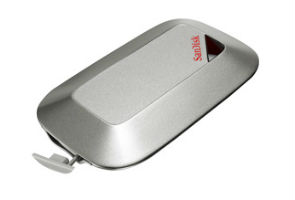
SanDisk has launched a slew of new products which include new SD cards, microSD card, a number of USB based products and a Memory Vault.

The Memory Vault intends to be a data preservation drive which will be a available in 8Gb and 16Gb variants. SanDisk claims the device will be able to preserve data for unto 100 years. It will cost Rs 3,499 for the 8GB version and will go upto Rs 5,499 for the 16GB version

.


Apart from the Memory Vault, SanDisk also launched the worlds fastest SD card, the SanDisk Extreme Pro SDXC UH-1 with a data transfer speed of up-to 90mb/seconds. It will be offered in various capacities with the maximum being 64 GB.

SanDisk also launched the world's fastest micro-SD card, the SanDisk Mobile ultra microSDXC, with a speed of upto 30mb/second and  64 GB of memory making it the largest microSD card to date.

The SDXC card range will start from Rs 2,199 for the 8GB version and will go upto Rs 16,299 for the 64 GB versions, while the microSDXC series will cost Rs 899 for the 4GB versions and will go upto Rs 14,799 for the 64 GB versions.


Friday, 16 September 2011

NetGenie router allows parents to filter Internet content

With NetGenie -Home, the new 3G and Wi-fi router just launched in India, parents can ensure their children are protected from inappropriate Internet content like pornography and violence. 

The router also comes in a variant suited for small offices who can now put a complete stop to their employees spending time on non-productive sites using NetGenie's Internet controls, which allow differing levels of Internet access.
NetGenie is a product of Cyberoam, a division of Elitecore Technologies.

NetGenie Home is available for Rs. 7,999 and NetGenie for small offices is available for Rs. 10,999

Monday, 29 August 2011

HP Touchsmart 610

Often, when we talk about a desktop PC, we imagine a set-up which includes a monstrosity called a Central Processing Unit (CPU), a fat ugly monitor, twin speakers with wires dangling all over the place and a Universal Powers Supply (Brick). Not very appealing is it?


Well, back in 1998 Steve Jobs had a solution when he returned to Apple - it was called the iMac and it's now become synonymous with modern day desktop computing.

It is something we call an all-in-one computer, and HP's latest TouchSmart 610 is exactly that: a computer which can live in our drawing room, unhindered by the visually unappealing bits of a standard desktop, without sacrificing performance. The TouchSmart 610 also adds a touch screen display cashing in on the tablet frenzy, but we will be the judges of the device's overall utility.

First Impression

On first impression, if we compare the TouchSmart 610 to an Apple iMac or a Lenovo IdeaCentre, we are obligated to point out it is not the most handsome all-in-one money can buy. It is, however, the most powerfulWindows all-in-one just on the basis of its specifications.

Clearly, HP has opted for a very business like industrial design which makes the TouchSmart 610 pretty chunky.  At 23x17.7x4.1 inches, the TouchSmart 610 is not the most slender of devices.

Something we really enjoyed about the TouchSmart 610 was the plethora of connectivity options we had at our disposal. On the left hand side of the machine we get twin USB ports, separate headphone and optical out jacks, memory card reader and volume controls and what not.

We are pampered with more USB connectivity in the rear, where HP has a designed a clever enclosure which contains four more USB, ports, another headphone out which also doubles as an optical out, and the essential Ethernet port.

So, on the TouchSmart 610, the connectivity options are right up there with a standard PC. This is one thing other competing all-in-ones cannot claim, with a maximum of four USB ports.

The 23-inch LCD Touch display is at the forefront and we also get a large grill beneath the display which is home to the Dr.Dre Beats speakers.

Apart from the display we get the regular wireless keyboard and mouse. Interestingly, the keyboard is super-slim and is very, very comfortable to type on, though we did notice some cheap plastic bits used in its construction. Frankly, it did not feel very sturdy!

HP also arms the TouchSmart 610 with a fantabulous reclining mechanism, which smoothly arches back and forth according to the user's requirements.  Some may like the bulky look and some may not, but one thing is for sure - this is the most well built HP desktop we have seen here in years, even if its not able to match the likes of the iMac on design, which admittedly is in a league of its own.

Another nicety we would like to mention is the nifty little web camera, which can also recline, in accordance with the user's orientation. One has to say the TouchSmart 610 is a very well engineered product. HP has clearly put in a lot of thought in designing it.

Multimedia

The all-in-one design has been optimized to deliver the best multimedia experience in a living room environment. While these machines may not posses hyper active daisy-chained SLI Graphics cards, they are usually adept at delivering a satisfactory multimedia experience to the household. We believe the HP TouchSmart 610 excels in this respect, as its large 23-inch touch display is perfect for multimedia consumption. The display may not boast of the Super HD resolutions of an iMac, but its 1920x1280 Full HD resolution display is crisp with deep blacks. The viewing angles are quite superlative. We tested this aspect in great detail and noticed that the depth remained pretty steady from all angles.

Another facet that impresses is that the top of the line HP TouchSmart 610 comes with a slot-loading Blu-Ray drive, which is the current de-facto standard for consuming HD content via physical disk based media.

Like all the high-end products shipped by HP, the TouchSmart 610 comes with the Dr.Dre Beats audio system installed. Beats consistsof the large built-in 20-watt speaker module along with enhanced Digital Signal Processing (DSP). Does it work? Heck, yeah. The moment we homed in on the AC/DC classic Highway To Hell we knew these were no ordinary speakers. The mid-range crunch of Angus Young's Gibson SG was wild, overdriven and searing, but yet managed immense clarity especially in comparison to other speakers we have seen on all-in-one computers including the iMac.  But this was not the crescendo; its real mojo was in playing Dr. Dre's patented genre - Hip-Hop. Be it the pop-panache of Lady Gaga or  Eminem's rapping prowess, the Beats audio system handled it all very ably. But before we get ahead of ourselves - these speakers sound sublime for the class of computer they come with, but by no means they would replace a 2.1-channel speaker system from a Logitech or Creative. That's just not going to happen!

Now, HP has named it the TouchSmart but believe us there is nothing smart about the Touch. We will give HP the benefit of doubt when we say that the lousy interface is not their own doing, but rather a folly on Microsoft's part who deliver Windows 7. In our humble opinion, the idea of poking and pointing with one's fingers at a desktop display for 8-hours is the not most productive way of doing work. Most probably HP is trying to get a bite of the Apple, as the tablet market has taken off like a Concord with the launch of the iPad. In HP's defense, the touch does become quite handy while using Paint and, once we managed to recline the TouchSmart 610, the display was pretty responsive. But that joy ride had its shelf life too - 25 minutes in total, after which our fingers grew, tired of being poked around like a stylus.

Besides this, HP loaded the TouchSmart 610 with their homemade media center software - also called TouchSmart - which did a pretty neat job of combining all the multimedia content inside one interface. TouchSmart is a standalone program and along side its media center roots, it adds multiple tidbits, such as a Facebook app, Tweet-deck like Twitter app and also an apps center.  We love the interface design, which reminded us of Android Widgets and also include a carousel like dock in the bottom  - but the clunky scrolling thanks to Windows 7 hampers the experience. Having said this, we must also mention that the TouchSmart 610 boasts of the most impressive touch interface donned by a Windows machine, but we are guessing that's not going gain HP many brownie points as once someone has experienced the iPad there is simply no going back, even if we are talking about a desktop.

As this is a machine destined for the living room, HP added a dedicated remote control. There is nothing special about this as most companies do this with their all-in-one product apart from, of course, the almighty Apple who'd rather you pay for the remote.

Performance

One thing is for sure - unlike the other all-in-one machines making the rounds, the HP TouchSmart 610 is definitely a powerful machine. Our testing unit came with the latest Core i5 Sandy Bridge processor clocked at 3.2 GHz with 4 cores, along side a more than decent AMD Radeon 5770 Graphical Processing Unit (GPU) with 1GB of memory, which can handle most modern PC games, unless one insists on playing the likes of Crysis 2  on maximum resolutions. Adding to the powerful processing prowess, we also get 4GB of RAM and 750GB of hard disk space to boot.

The specs are definitely pretty high end and it showed its mettle in daily usage. As journalists, we're used to multitasking on our computers, with various programs running simultaneously, such as Adobe Photoshop, Microsoft Outlook, Microsoft Word, Mozilla Firefox, iTunes being open almost incessantly. So a Windows based machine can be prone to the odd hang, but even after using the TouchSmart 610 for five days we didn't come across anything of the sort. Hats off to HP as normally raw specs do not always get converted to such solidity in terms of regular performance. Yes, we agree machines may render graphics beautifully and would handle heavy duty softwares like Nuendo pretty well, but they rarely show such consistent performance over a period of five days where the machine was not even shut down once.

When it came down to raw horsepower we already knew it had the goods to deliver, but this too was tested pretty thoroughly. We encoded multiple video files from the .MKV format to .MP4 and all this was handled swiftly while we were running iTunes in the background alongside, Word and Outlook. Not too shabby.

Even when we tried testing its graphical prowess the TouchSmart 610 had the goods. Mass Effect 2 ran smoothly at 60 FPS on maximum resolution, though we did see the odd blip in the frame rate towards the ending sections of the game where the action sequences reached fever pitch.  While the graphics are impressive they are not suited for newer games such as Crysis 2 on maximum settings as these games tend to demand a higher caliber of graphical performance.

To complete our suite of tests, we had to run the PCMark Vantage and 3DMark benchmark tests. This was a painful experience as for some reason our copies refused to run, but after a long struggle we managed to get them up with some interesting results.

On the PCMark Vantage the TouchSmart 610 scored an impressive 8174 and on the 3D mark test it scored a more than adequate 7041. On the whole, the TouchSmart 610 was quite a screamer.

Verdict

At approximately
Rs. 75,000, the HP TouchSmart 610 is truly a very smart all-in-one PC, but we do have reservations about its Touch interface, which is less than ideal.

As a home entertainment hub, the TouchSmart 610 will meet all demands without breaking a sweat.

The only problem is its bulky design - for an all-in-one - and slightly steep price tag, as one could easily buy a similarly speced standard desktop for less than
Rs. 60,000. So, it will only appeal to those who are hell bent on a powerful all-in-one machine, and we dare say it's the best one making the rounds amongst those running Windows.

Pros
Impressive performance
Intelligently engineered
Fabulous Display

Cons
Bulky
Pricey
Not a Smart Touch

Price:
Rs. 74,999


RATINGS:
Performance: 4.5
Price: 3
Ease of setup: 4.5
Ergonomics: 4
Wow Factor: 3
Overall: 3.9

Tuesday, 16 August 2011

How to unlock and start a car - with a text message

Thought your shiny new car looked pretty impregnable? Think again. Two researchers have shown that they can unlock a car  - and even start the engine - using a simple text message.

Don Bailey and Matthew Solnik, researchers at iSEC Partners presented their work at the Black Hat 2011 security conference in Las Vegas, explaining how they can use an Android phone to carry out a  technique they've dubbed "war-texting". The new technique relies on intercepting text messages, which many devices use to send commands or even firmware (permanent software programmed into a read-only memory) updates.

By setting up a local GSM network in the vicinity of a Subaru Outback, the team were able to intercept password authentication messages sent between the electronic key fob and the vehicle. What happens next is not exactly known, because the researchers haven't divulged all their secrets as a courtesy to the manufacturer.

However, what we do know is that intercepting those authentication messages allowed the team to understand the basic commands required to communicate with the security system of the car. Once they knew those details, they were able to send their own messages to the system in order to reverse-engineer the firmware - effectively learning how the entire device works.

From there, they could work out which commands were useful, and write their own messages to send that could unlock - and even start the engine of - the car. The whole process took them just a matter of hours. The team haven't gone into detail about which other cars might share these vulnerabilities, but the communication devices built into the vehicle are generic items - so the chances are that the problem could be widespread.

More worryingly, their technique could be used to attack other systems. Any device that routinely recieves firmware updates via text message, such as traffic control systems and security cameras, could be fair game. Perhaps worst of all, it could also attack SCADA sensors, which are used to monitor industrial systems such as the power grid and water supplies. "I could care less if I could unlock a car door," Don Bailey told CNN. "It's cool. It's sexy. But the same system is used to control phone, power, traffic systems. I think that's the real threat."

Though there has been no formal statement made by Subaru, Bailey has notified the manufacturer, and they are apparently taking steps to remedy the situation

Microsoft Opens Up About Windows 8

If you're dying for more Windows 8 news then you'll want to bookmark Microsoft's brand new blog, Building Windows 8 where the software giant plans to start dishing on the next iteration of its OS. Microsoft says it will use the new blog to talk about forthcoming features, user interface decisions, engineering and other Windows 8-related news. "We know developers, IT pros, and gamers all want to know what's new [in Windows 8] for them," wrote Steven Sinofsky, president of Microsoft's Windows and Windows Live division. "There is so much packed into Windows 8...so we want to be sure to take the time to cover as many of these topics as possible."


Microsoft did something similar during the development of Windows 7 with a blog called Engineering Windows 7.
Biggest Refresh Since Windows 95
Sinofsky's debut post for the new Windows 8 blog was short on specifics about the new OS beyond what Microsoft showed off in June. Instead, Sinofsky reiterated Microsoft's vision for the next version of Windows, which the Microsoft exec says will be the biggest revamp of Windows since Windows 95.
"Windows 8 reimagines Windows for a new generation of computing devices," Sinofsky said. "Today more than two out of three PCs are mobile (laptops, netbooks, notebooks, tablets, slates, convertibles, etc.)... Screen sizes range from under 10" to wall-sized screens and multiple HD screens. Storage has jumped from megabytes to terabytes and has moved up to the cloud...These changes in the landscape motivate the most significant changes to Windows, from the chips to the experience."
Microsoft Opens Up About Windows 8Windows 8 Peek-A-Boo
Microsoft surprised many in June during its sneak peek at the brand new interface for Windows 8 since the new Microsoft OS will sport a touch-centric interface for use on both traditional mouse-and-keyboard PCs as well as tablets.
Windows 8 will also be the first version of Windows built to run on ARM-based and Intel x86 chips. Apps for the new OS will rely on HTML and JavaScript as the primary development languages.
Since Windows 8 appears to be such a tectonic shift for Windows, Sinofsky expects a lot of people will want to express their opinions about Microsoft's plans. If you fall into that category, Sinfosky has invited you to email him directly here.
Microsoft's next major outing for Windows 8 will be in September during the company's BUILD developer conference. The company plans to show off Windows 8's development tools as well as the OS' new capabilities, according to Sinofsky. The BUILD conference keynote address, where Microsoft is likely to release more information about Windows 8, is scheduled for Tuesday, September 13 from 9-11 a.m. Pacific.

Thursday, 11 August 2011

NOKIA N900 IS A FIRST LINUX OS MOBILE

Nokia unveiled N900, its first smart phone running on Linux software, aiming at improving its offering at the top end of the market.
The Nokia N900 runs on the Linux-based Maeme 5 software, featuring true multitasking with applications as well as Web browsing with Adobe Flash support.
Nokia’s workhorse Symbian operating system controls half of the smartphone market volume — more than its rivals Apple, Research in Motion and Google put together. Nokia said Linux would work well in parallel with Symbian in its high-end product range.
“As Nokia announces the software platform that will drive its future services aspirations it created a dedicated solutions unit — the challenge will be to ensure that all these elements work in harmony in the face of fierce competition from Apple and Google,” said Ben Wood, head of research at CCS Insight.
The new N900 model, with cellular connection, touch screen and slide-out keyboard, will retail for around $712, excluding subsidies and taxes.
Nokia also unveiled a new Solutions business unit, which aims to better tie together its phone operations and new mobile Internet services offering.
Technical details of N900:
Display:
3.5 inch touch-sensitive widescreen display
800 × 480 pixel resolution
Web browsing:
Maemo browser powered by Mozilla technology
Adobe Flash™ 9.4 support
Full screen browsing

Camera:
5 megapixel camera (2584 × 1938 pixels)
Image formats: JPEG
CMOS sensor, Carl Zeiss optics, Tessar lens
3 × digital zoom
Autofocus with assist light and two-stage capture key
Dual LED flash
Full-screen viewfinder
Photo editor on device
TV out (PAL/NTSC) with Nokia Video Connectivity Cable (CA-75U, included in box) or WLAN/UPnP
Landscape (horizontal) orientation
Capture modes: Automatic, portrait, video, macro, landscape, action
Video:
Wide aspect ratio 16:9 (WVGA)
Video recording file format: .mp4; codec: MPEG-4
Video recording at up to 848 × 480 pixels (WVGA) and up to 25fps
Video playback file formats: .mp4, .avi, .wmv, .3gp; codecs: H.264, MPEG-4, Xvid, WMV, H.263
Music and audio playback:
Maemo media player
Music playback file formats: .wav, .mp3, .AAC, .eAAC, .wma, .m4a
Built-in FM transmitter
Ring tones: .wav, .mp3, .AAC, .eAAC, .wma, .m4a
FR, EFR, WCDMA, and GSM AMR
Digital stereo microphone
DLNA

A NEUROCHIP THAT CAN COMMUNICATE WITH BRAIN

The University of Calgary, Faculty of Medicine scientists who proved it is possible to cultivate a network of brain cells that reconnect on a silicon chip—or the brain on a microchip—have developed new technology that monitors brain cell activity at a resolution never achieved before.
Developed with the National Research Council Canada (NRC), the new silicon chips are also simpler to use, which will help future understanding of how brain cells work under normal conditions and permit drug discoveries for a variety of neurodegenerative diseases, such as Alzheimer’s and Parkinson’s.
Naweed Syed's lab cultivated brain cells on a microchip.
The new technology from the lab of Naweed Syed, in collaboration with the NRC, is published online this month in the journal, Biomedical Devices.
“This technical breakthrough means we can track subtle changes in brain activity at the level of ion channels and synaptic potentials, which are also the most suitable target sites for drug development in neurodegenerative diseases and neuropsychological disorders,” says Syed, professor and head of the Department of Cell Biology and Anatomy, member of the Hotchkiss Brain Institute and advisor to the Vice President Research on Biomedical Engineering Initiative of the U of C.
The new neurochips are also automated, meaning that anyone can learn to place individual brain cells on them. Previously it took years of training to learn how to record ion channel activity from brain cells, and it was only possible to monitor one or two cells simultaneously. Now, larger networks of cells can be placed on a chip and observed in minute detail, allowing the analysis of several brain cells networking and performing automatic, large-scale drug screening for various brain dysfunctions.
This new technology has the potential to help scientists in a variety of fields and on a variety of research projects. Gerald Zamponi, professor and head of the Department of Physiology and Pharmacology, and member of the Hotchkiss Brain Institute, says, “This technology can likely be scaled up such that it will become a novel tool for medium throughput drug screening, in addition to its usefulness for basic biomedical research”.